LangChain 🔌 MCP Python-based implementation. Trusted by 3000+ developers. Trusted by 3000+ developers. Trusted by 3000+ developers.
Documentation
LangChain MCP Adapters
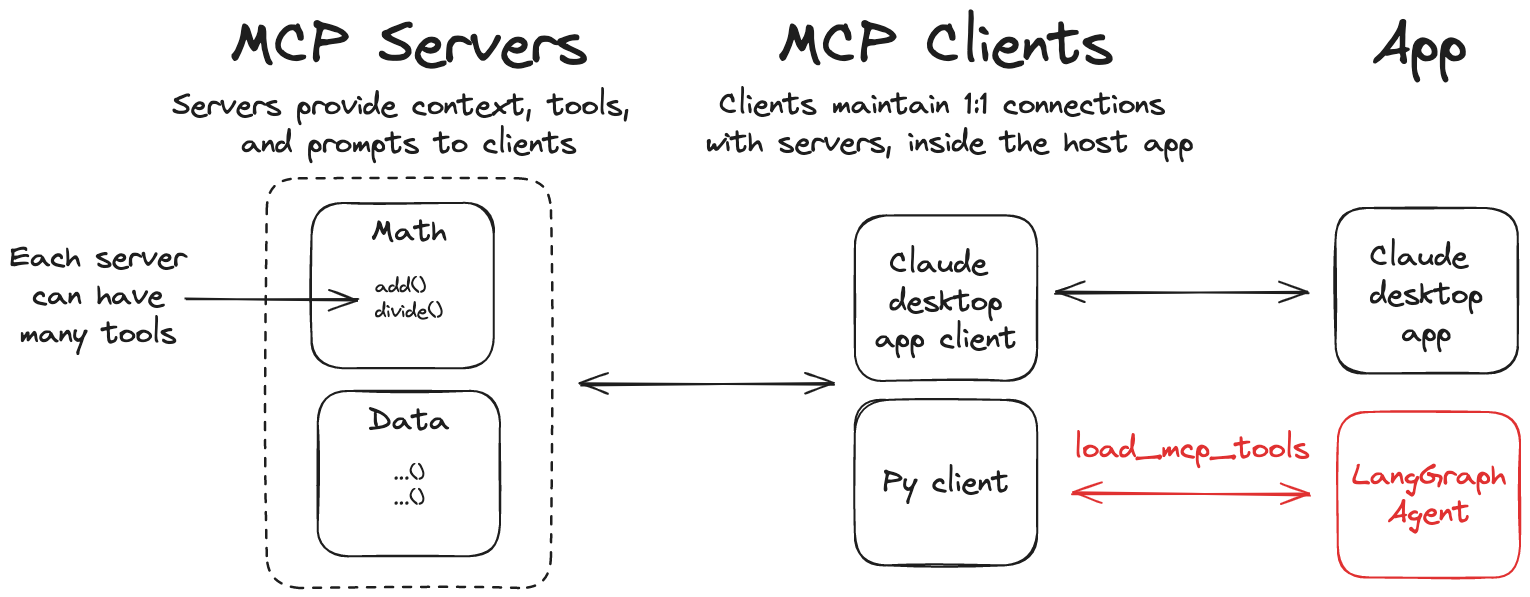
This library provides a lightweight wrapper that makes Anthropic Model Context Protocol (MCP) tools compatible with LangChain and LangGraph.
[!note]
A JavaScript/TypeScript version of this library is also available at langchainjs.
Features
- 🛠️ Convert MCP tools into LangChain tools that can be used with LangGraph agents
- 📦 A client implementation that allows you to connect to multiple MCP servers and load tools from them
Installation
pip install langchain-mcp-adaptersQuickstart
Here is a simple example of using the MCP tools with a LangGraph agent.
pip install langchain-mcp-adapters langgraph "langchain[openai]"

export OPENAI_API_KEY=
Server
First, let's create an MCP server that can add and multiply numbers.
# math_server.py
from mcp.server.fastmcp import FastMCP

mcp = FastMCP("Math")

@mcp.tool()
def add(a: int, b: int) -> int:
    """Add two numbers"""
    return a + b

@mcp.tool()
def multiply(a: int, b: int) -> int:
    """Multiply two numbers"""
    return a * b

if __name__ == "__main__":
    mcp.run(transport="stdio")
Client
# Create server parameters for stdio connection
from mcp import ClientSession, StdioServerParameters
from mcp.client.stdio import stdio_client

from langchain_mcp_adapters.tools import load_mcp_tools
from langchain.agents import create_agent

server_params = StdioServerParameters(
    command="python",
    # Make sure to update to the full absolute path to your math_server.py file
    args=["/path/to/math_server.py"],
)

async with stdio_client(server_params) as (read, write):
    async with ClientSession(read, write) as session:
        # Initialize the connection
        await session.initialize()

        # Get tools
        tools = await load_mcp_tools(session)

        # Create and run the agent
        agent = create_agent("openai:gpt-4.1", tools)
        agent_response = await agent.ainvoke({"messages": "what's (3 + 5) x 12?"})
Multiple MCP Servers
The library also allows you to connect to multiple MCP servers and load tools from them:
Server
# math_server.py
...

# weather_server.py
from typing import List
from mcp.server.fastmcp import FastMCP

mcp = FastMCP("Weather")

@mcp.tool()
async def get_weather(location: str) -> str:
    """Get weather for location."""
    return "It's always sunny in New York"

if __name__ == "__main__":
mcp.run(transport="http")python weather_server.pyClient
from langchain_mcp_adapters.client import MultiServerMCPClient
from langchain.agents import create_agent

client = MultiServerMCPClient(
    {
        "math": {
            "command": "python",
            # Make sure to update to the full absolute path to your math_server.py file
            "args": ["/path/to/math_server.py"],
            "transport": "stdio",
        },
        "weather": {
            # Make sure you start your weather server on port 8000
            "url": "http://localhost:8000/mcp",
            "transport": "http",
        }
    }
)
tools = await client.get_tools()
agent = create_agent("openai:gpt-4.1", tools)
math_response = await agent.ainvoke({"messages": "what's (3 + 5) x 12?"})
weather_response = await agent.ainvoke({"messages": "what is the weather in nyc?"})
[!note]
Example above will start a new MCP
ClientSessionfor each tool invocation. If you would like to explicitly start a session for a given server, you can do:```python
from langchain_mcp_adapters.tools import load_mcp_tools
client = MultiServerMCPClient({...})
async with client.session("math") as session:
tools = await load_mcp_tools(session)
```
Streamable HTTP
MCP now supports streamable HTTP transport.
To start an example streamable HTTP server, run the following:
cd examples/servers/streamable-http-stateless/
uv run mcp-simple-streamablehttp-stateless --port 3000
Alternatively, you can use FastMCP directly (as in the examples above).
To use it with Python MCP SDK streamablehttp_client:
# Use server from examples/servers/streamable-http-stateless/

from mcp import ClientSession
from mcp.client.streamable_http import streamablehttp_client

from langchain.agents import create_agent
from langchain_mcp_adapters.tools import load_mcp_tools

async with streamablehttp_client("http://localhost:3000/mcp") as (read, write, _):
    async with ClientSession(read, write) as session:
        # Initialize the connection
        await session.initialize()

        # Get tools
        tools = await load_mcp_tools(session)
        agent = create_agent("openai:gpt-4.1", tools)
        math_response = await agent.ainvoke({"messages": "what's (3 + 5) x 12?"})
Use it with MultiServerMCPClient:
# Use server from examples/servers/streamable-http-stateless/
from langchain_mcp_adapters.client import MultiServerMCPClient
from langchain.agents import create_agent

client = MultiServerMCPClient(
    {
        "math": {
            "transport": "http",
            "url": "http://localhost:3000/mcp"
        },
    }
)
tools = await client.get_tools()
agent = create_agent("openai:gpt-4.1", tools)
math_response = await agent.ainvoke({"messages": "what's (3 + 5) x 12?"})
Passing runtime headers
When connecting to MCP servers, you can include custom headers (e.g., for authentication or tracing) using the headers field in the connection configuration. This is supported for the following transports:
ssehttp(orstreamable_http)
Example: passing headers with MultiServerMCPClient
from langchain_mcp_adapters.client import MultiServerMCPClient
from langchain.agents import create_agent

client = MultiServerMCPClient(
    {
        "weather": {
            "transport": "http",
            "url": "http://localhost:8000/mcp",
            "headers": {
                "Authorization": "Bearer YOUR_TOKEN",
                "X-Custom-Header": "custom-value"
            },
        }
    }
)
tools = await client.get_tools()
agent = create_agent("openai:gpt-4.1", tools)
response = await agent.ainvoke({"messages": "what is the weather in nyc?"})
Only
sseandhttptransports support runtime headers. These headers are passed with every HTTP request to the MCP server.
Tool error handling
MCP distinguishes a tool *execution* error (CallToolResult(isError=True), e.g. "project not found") from a protocol/transport failure. By default, an execution error is returned to the model as a ToolMessage with status="error", so the agent can see what went wrong and self-correct instead of the run crashing:
client = MultiServerMCPClient({...})
tools = await client.get_tools()  # handle_tool_errors=True by default
To restore the legacy behavior — raising a ToolException on execution errors — set handle_tool_errors=False:
client = MultiServerMCPClient({...}, handle_tool_errors=False)
# or, at the tool-loading level:
tools = await load_mcp_tools(session, handle_tool_errors=False)
The error's content blocks are preserved verbatim on the
ToolMessage. The one exception: if the MCP error has no content at all, a minimal placeholder text block is substituted so the tool message isn't empty (a fragile shape for some model providers) — this placeholder is adapter-generated, not server-provided error detail.Transport/session failures and content-conversion errors (e.g. unsupported audio content) always raise regardless of this setting; only MCP execution errors (
isError=True) are governed by it.
Using with LangGraph StateGraph
from langchain_mcp_adapters.client import MultiServerMCPClient
from langgraph.graph import StateGraph, MessagesState, START
from langgraph.prebuilt import ToolNode, tools_condition

from langchain.chat_models import init_chat_model
model = init_chat_model("openai:gpt-4.1")

client = MultiServerMCPClient(
    {
        "math": {
            "command": "python",
            # Make sure to update to the full absolute path to your math_server.py file
            "args": ["./examples/math_server.py"],
            "transport": "stdio",
        },
        "weather": {
            # make sure you start your weather server on port 8000
            "url": "http://localhost:8000/mcp",
            "transport": "http",
        }
    }
)
tools = await client.get_tools()

def call_model(state: MessagesState):
    response = model.bind_tools(tools).invoke(state["messages"])
    return {"messages": response}

builder = StateGraph(MessagesState)
builder.add_node(call_model)
builder.add_node(ToolNode(tools))
builder.add_edge(START, "call_model")
builder.add_conditional_edges(
    "call_model",
    tools_condition,
)
builder.add_edge("tools", "call_model")
graph = builder.compile()
math_response = await graph.ainvoke({"messages": "what's (3 + 5) x 12?"})
weather_response = await graph.ainvoke({"messages": "what is the weather in nyc?"})
Using with LangGraph API Server
[!TIP]
Check out this guide on getting started with LangGraph API server.
If you want to run a LangGraph agent that uses MCP tools in a LangGraph API server, you can use the following setup:
# graph.py
from contextlib import asynccontextmanager
from langchain_mcp_adapters.client import MultiServerMCPClient
from langchain.agents import create_agent

async def make_graph():
    client = MultiServerMCPClient(
        {
            "weather": {
                # make sure you start your weather server on port 8000
                "url": "http://localhost:8000/mcp",
                "transport": "http",
            },
            # ATTENTION: MCP's stdio transport was designed primarily to support applications running on a user's machine.
            # Before using stdio in a web server context, evaluate whether there's a more appropriate solution.
            # For example, do you actually need MCP? or can you get away with a simple `@tool`?
            "math": {
                "command": "python",
                # Make sure to update to the full absolute path to your math_server.py file
                "args": ["/path/to/math_server.py"],
                "transport": "stdio",
            },
        }
    )
    tools = await client.get_tools()
    agent = create_agent("openai:gpt-4.1", tools)
    return agent
In your [langgraph.json](https://langchain-ai.github.io/langgraph/cloud/reference/cli/#configuration-file) make sure to specify make_graph as your graph entrypoint:
{
  "dependencies": ["."],
  "graphs": {
    "agent": "./graph.py:make_graph"
  }
}
Similar MCP
Based on tags & features
Trending MCP
Most active this week