Track MCP LogoTrack MCP

The world's largest repository of Model Context Protocol servers. Discover, explore, and submit MCP tools.

Product

  • Categories
  • Top MCP
  • New & Updated
  • Submit MCP

Company

  • About

Legal

  • Privacy Policy
  • Terms of Service
  • Cookie Policy

© 2026 TrackMCP. All rights reserved.

Built with ❤️ by Krishna Goyal

    Hello Mcp Go

    mcp server in go

    5 stars
    Go
    Updated Apr 26, 2025

    Table of Contents

    • What is this? 🤔
    • Tools 🌟
    • Quick Start 🚀
    • Consuming the Server with GitHub Copilot Agent Mode 🍴
    • Have Fun! 🎉

    Table of Contents

    • What is this? 🤔
    • Tools 🌟
    • Quick Start 🚀
    • Consuming the Server with GitHub Copilot Agent Mode 🍴
    • Have Fun! 🎉

    Documentation

    Hello MCP Go 👋

    Welcome to the Hello MCP Go repository! 🚀 This project demonstrates how to build an MCP (Model Context Protocol) server in Go. Whether you're a Go enthusiast or just curious about MCP, you're in the right place! 🛠️

    What is this? 🤔

    This repository showcases:

    • How to build an MCP server using Go 🐹.
    • A simple and fun way to explore MCP Protocol 🎮.
    • A starting point for your own custom MCP server adventures! 🌟

    Tools 🌟

    • hello, takes the parameters Submitter and Content.
    • calculate, takes the parameters A and B. Example use is "calculate 2 and 4".

    Quick Start 🚀

    • Clone
    • Install
    • Build
    • Run

    1. Clone the repository:

    bash
    git clone https://github.com/your-username/hello-mcp-go.git
        cd hello-mcp

    2. Install dependencies:

    bash
    go mod tidy

    3. Build the project:

    bash
    go build -ldflags="-s -w" -o server.exe main.go

    or for Linux:

    bash
    go build -ldflags="-s -w" -o server main.go

    You will use this later when you want to consume it from Visual Studio Code.

    1. Run the server:

    bash
    ./server

    Consuming the Server with GitHub Copilot Agent Mode 🍴

    1. Place yourself in *mcp.json*, make sure the server has been built (right now it's adjusted).

    1. Adjust the "command" to point to the absolute path of your executable.

    json
    {
         "servers": {
            "my-mcp-server-d73c20f3": {
                "type": "stdio",
                "command": "/path/to/your/executable"
            }
         }
       }

    1. Open Copilot and select Agent in dropdown

    1. Select the play icon.

    You should see the tool icon showing two tools.

    1. Test it with a phrase like so "calculate 2 and 4". This should present a button that invokes the tool on the server.
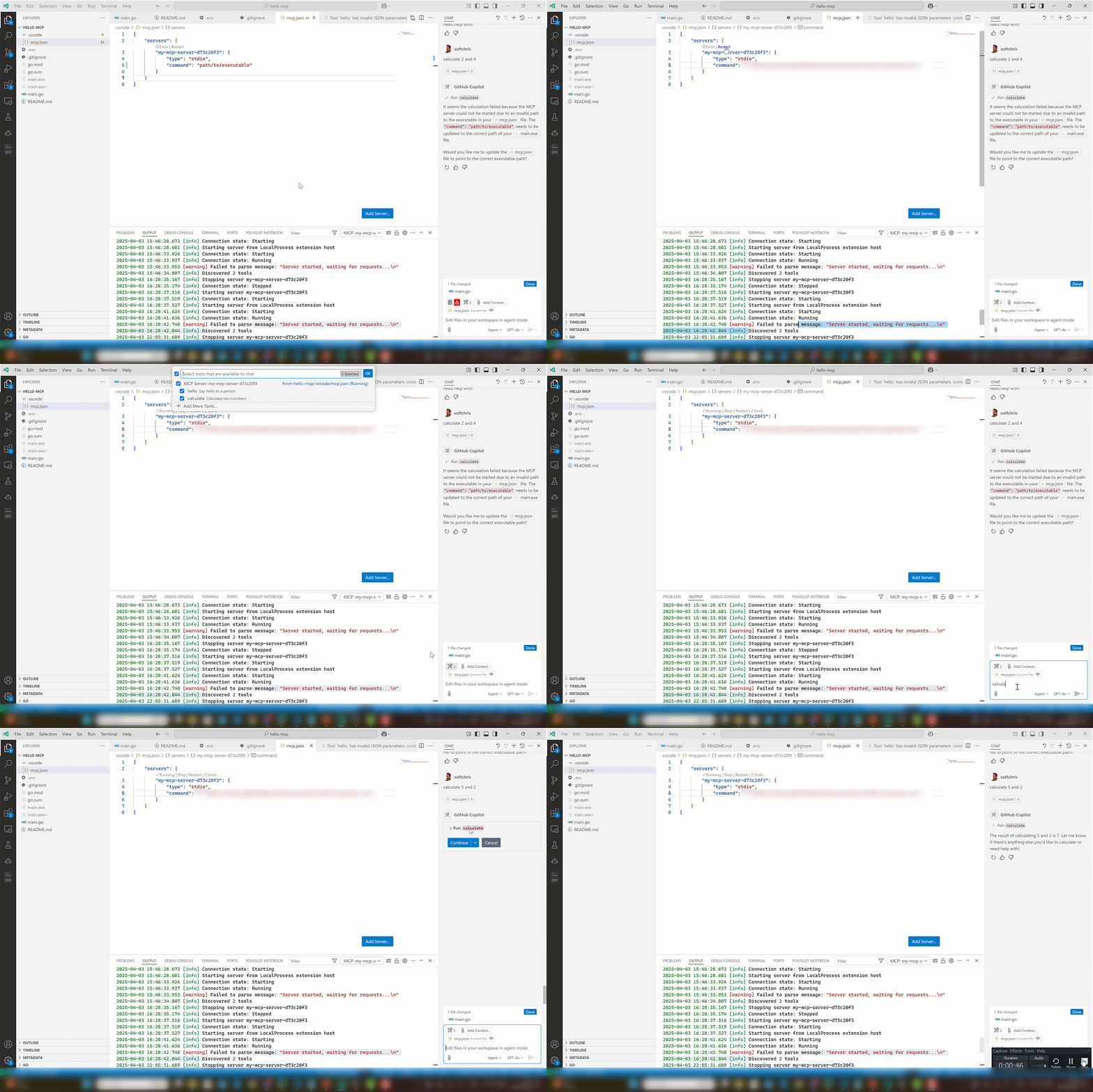
    MCP Go conuming it via Visual Studio Code

    Have Fun! 🎉

    This project is all about learning and having fun. Feel free to experiment, break things, and create something amazing! 🌈

    Happy coding! 💻

    Similar MCP

    Based on tags & features

    • MC

      Mcpjungle

      Go·
      617
    • AN

      Anyquery

      Go·
      1.4k
    • YU

      Yutu

      Go·
      317
    • MC

      Mcp Cyclops

      Go·
      29

    Trending MCP

    Most active this week

    • PL

      Playwright Mcp

      TypeScript·
      22.1k
    • SE

      Serena

      Python·
      14.5k
    • MC

      Mcp Playwright

      TypeScript·
      4.9k
    • MC

      Mcp Server Cloudflare

      TypeScript·
      3.0k
    View All MCP Servers

    Similar MCP

    Based on tags & features

    • MC

      Mcpjungle

      Go·
      617
    • AN

      Anyquery

      Go·
      1.4k
    • YU

      Yutu

      Go·
      317
    • MC

      Mcp Cyclops

      Go·
      29

    Trending MCP

    Most active this week

    • PL

      Playwright Mcp

      TypeScript·
      22.1k
    • SE

      Serena

      Python·
      14.5k
    • MC

      Mcp Playwright

      TypeScript·
      4.9k
    • MC

      Mcp Server Cloudflare

      TypeScript·
      3.0k