A Model Context Protocol (MCP) server for generating images using Doubao API. This server provides image generation capabilities with customizable parameters including prompt, size, seed, and guidance scale.
Documentation
Doubao Image Generation MCP Server
An image generation MCP server based on FastMCP framework and Volcano Engine API, supporting high-quality image generation through Doubao (doubao-seedream-3.0-t2i) model.
1. Features
- 🎨 High-Quality Image Generation: Based on Doubao seedream-3.0-t2i model, supports 2K resolution
- 🌐 Bilingual Support: Prompts support both Chinese and English descriptions
- 📐 Multiple Resolutions: Supports various resolutions from 512x512 to 2048x2048
- 🎯 Precise Control: Supports seed, guidance scale, watermark and other parameter controls
- 📁 Local Storage: Automatically downloads and saves generated images to specified directory
- 🔧 MCP Protocol: Fully compatible with MCP protocol, can be integrated with MCP-supported AI assistants
- 📊 Detailed Logging: Complete logging and error handling
2. Requirements
- Python >= 3.13
- Volcano Engine API Key
- Inference Endpoint Model ID
3. Installation & Configuration
3.1 Clone Project
git clone git@github.com:suibin521/doubao-image-mcp-server.git
cd doubao-image-mcp-server
3.2 Installation Methods
Method 1: Using uvx for Direct Execution (Recommended)
# Install and run directly from PyPI
uvx doubao-image-mcp-server
Method 2: Using uv to Install to Project
# Install to current project
uv add doubao_image_mcp_server
Method 3: Developer Installation
# After cloning the repository, execute in project root directory
uv sync
# Or using pip
pip install -e .
Method 4: Traditional pip Installation
pip install doubao_image_mcp_server3.3 Configure Environment Variables
This project does not use .env files. All configurations are passed through the env field in the MCP JSON configuration file.
3.3.1 Environment Variable Configuration Example
"env": {
  "BASE_URL": "https://ark.cn-beijing.volces.com/api/v3",
  "DOUBAO_API_KEY": "your-dev-api-key-here",
  "API_MODEL_ID": "ep-20250528154802-c4np4",
  "IMAGE_SAVE_DIR": "C:/images"
}
3.3.2 Environment Variable Detailed Description
1. BASE_URL (API Base Address)
- Purpose: Base API address for Doubao (Volcano Engine) platform
- Default Value:
https://ark.cn-beijing.volces.com/api/v3 - Description: This is the API address for Volcano Engine platform in Beijing region, generally no need to modify
- Example:
"BASE_URL": "https://ark.cn-beijing.volces.com/api/v3"
2. DOUBAO_API_KEY (API Key)
- Purpose: API key for authentication
- How to Get: Create and obtain from Volcano Engine console
- Format: Usually a UUID format string
- Note: Please keep your API key safe and do not leak it to others
3. API_MODEL_ID (Model Endpoint ID)
- Purpose: Specifies the inference endpoint ID of the image generation model to use
- How to Get: Obtained after creating an inference endpoint in Volcano Engine console
- Format: String starting with "ep-"
- Example:
"API_MODEL_ID": "ep-20250528154802-c4np4" - Description: Each inference endpoint has a unique ID to identify a specific model instance
4. IMAGE_SAVE_DIR (Image Save Directory)
- Purpose: Specifies the local directory path where generated images are saved
- Path Format: Supports both relative and absolute paths
- Absolute Path Example:
"IMAGE_SAVE_DIR": "C:/images" - Description: If the directory does not exist, the program will create it automatically
3.4 Get API Key and Model ID
3.4.1 Register Volcano Engine Platform
Use the following URL to log in to Volcano platform and register. You can select the language (Chinese or English) in the upper right corner:
https://console.volcengine.com/auth/signup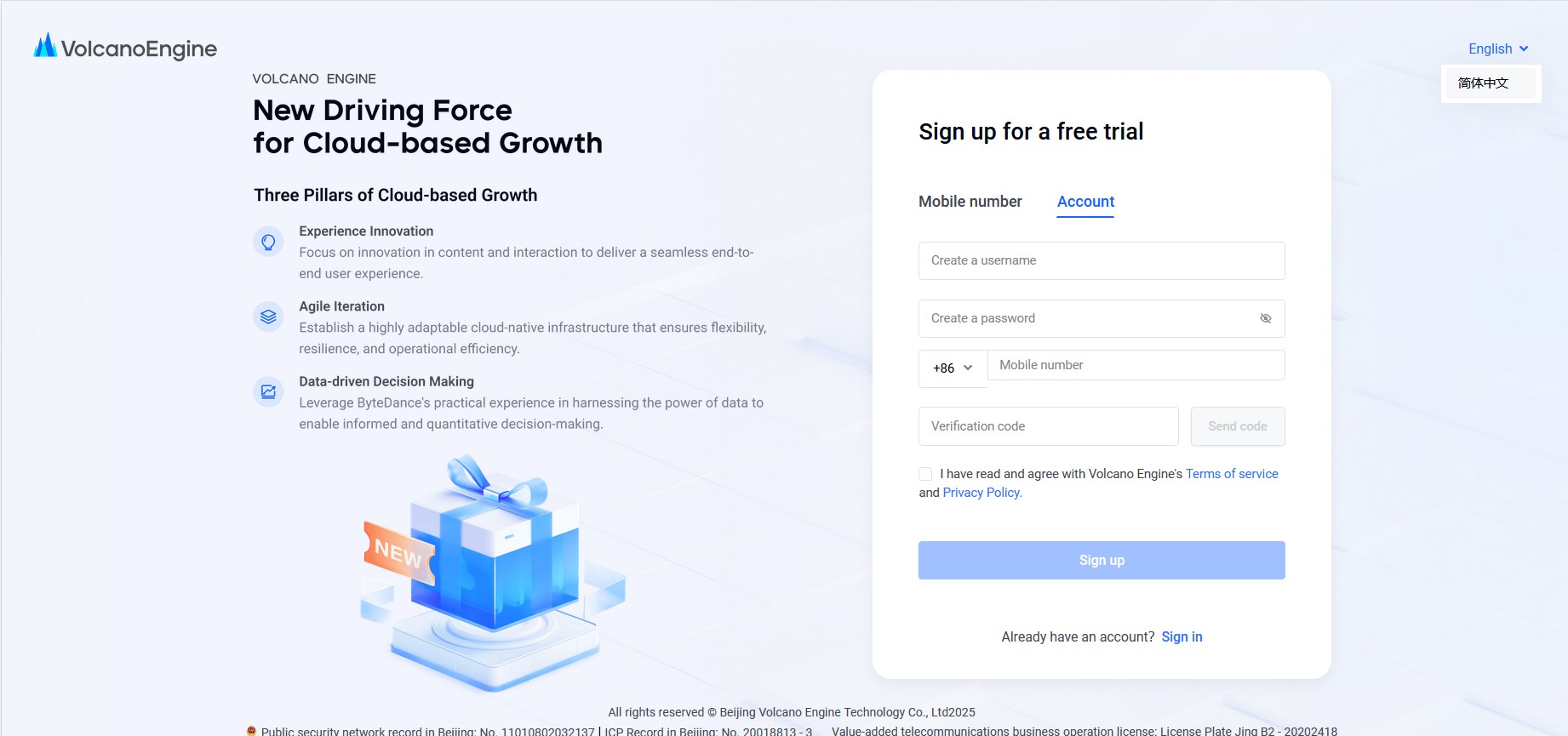
3.4.2 Login to Volcano Engine Console
After registration, visit the Volcano Engine console:
https://console.volcengine.com/ark/region:ark+cn-beijing/overview?briefPage=0&briefType=introduce&type=new3.4.3 Activate Image Generation Model "Doubao-Seedream-3.0-t2i"
1. Go to System Management → Activation Management interface
2. Select Vision Large Model
3. Find the Doubao-Seedream-3.0-t2i model
4. Click the "Activate service" button on the right to activate the service
Access link:
https://console.volcengine.com/ark/region:ark+cn-beijing/openManagement?LLM=%7B%7D&OpenTokenDrawer=false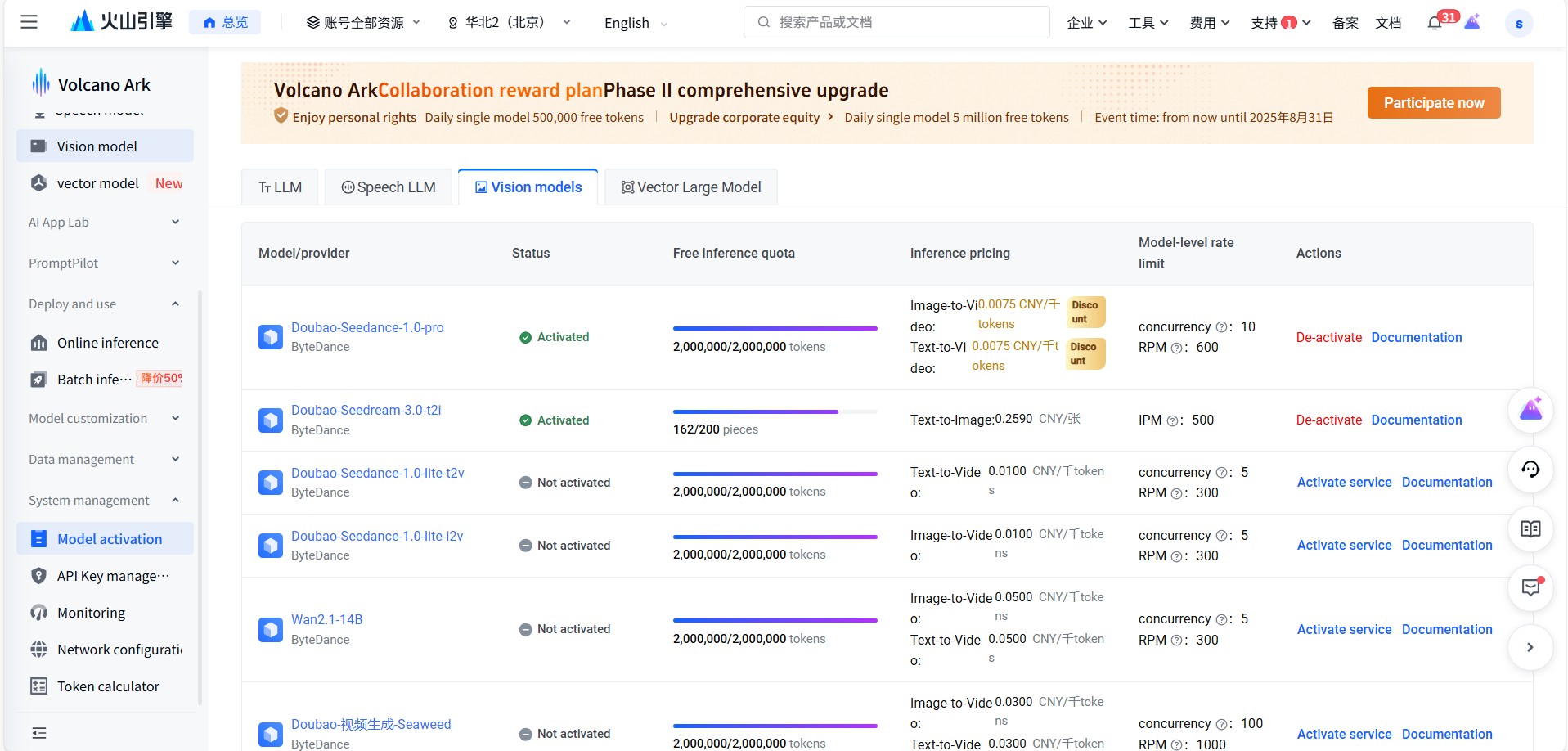
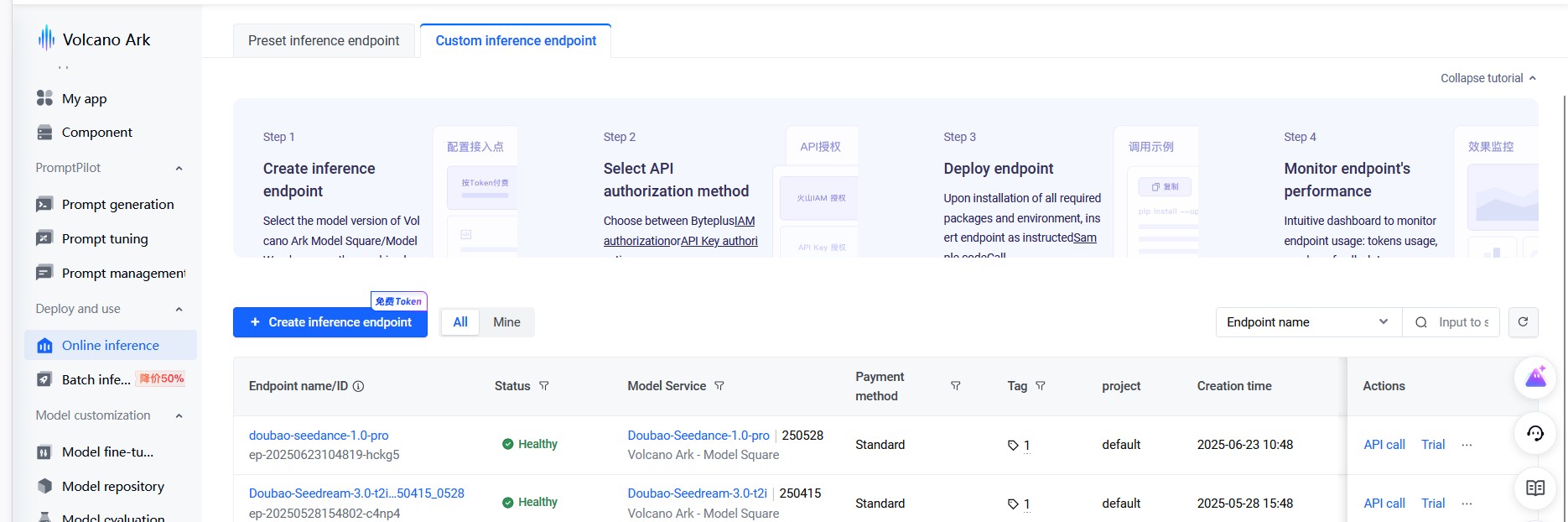
3.4.4 Create Inference Endpoint
1. In the console, click Online inference → Create inference endpoint
2. Enter the following information:
- Endpoint name: Give your endpoint a name
- Endpoint description: Add description information
- Model selection: Select the Doubao-Seedream-3.0-t2i model you just activated
3. Click the Create button to create the endpoint
4. After creation, you can see the corresponding Model_id in the overview interface (format like: ep-m-20250528154647-cx5fg)
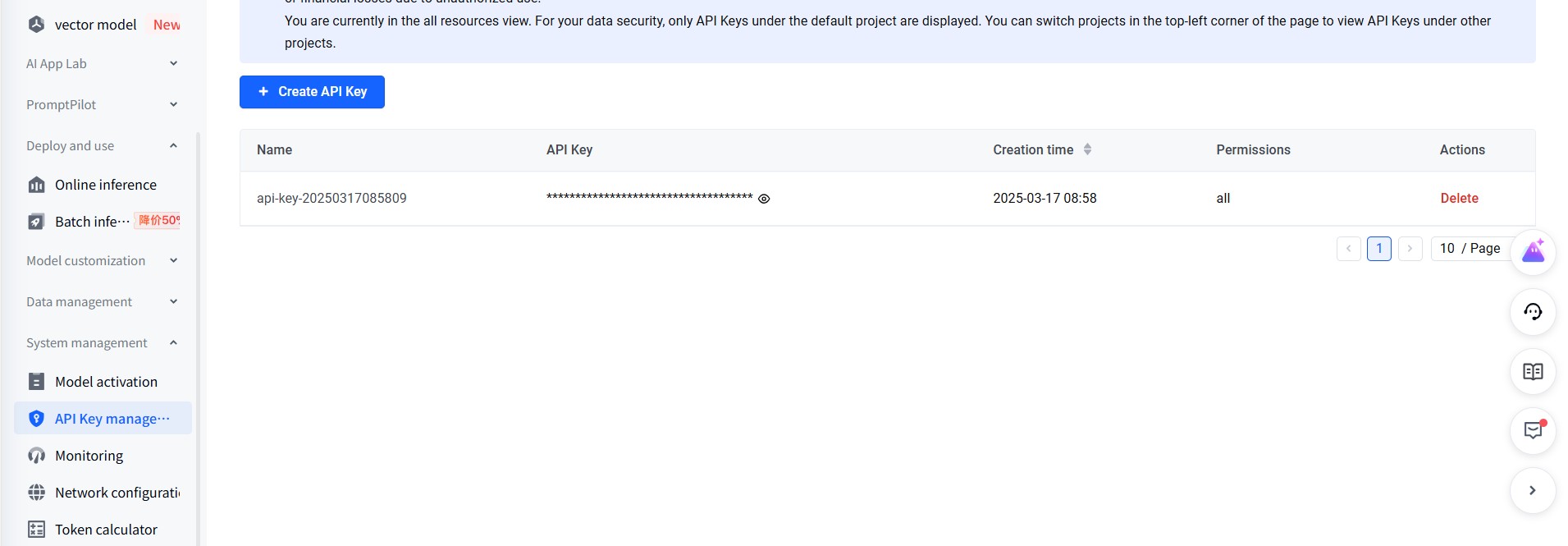
3.4.5 Create API Key
1. Select API Key management on the right side of the console
2. Click Create API Key
3. Generate and save your API key (please keep it safe and do not leak it)
3.4.6 Configuration Information Acquisition Complete
After completing the above steps, you will obtain the following configuration information:
- BASE_URL:
https://ark.cn-beijing.volces.com/api/v3(fixed value) - DOUBAO_API_KEY: The API key you just created
- API_MODEL_ID: The Model_id of the inference endpoint (like:
ep-m-20250528154647-cx5fg) - IMAGE_SAVE_DIR: Image save directory path
4. Usage
4.1 Configure MCP Server in Development Tools
This server supports use in various AI development tools, including VS Code + Cline, Cursor, Trae, etc. Configuration method is as follows:
4.1.1 MCP Configuration File Setup
Add the following configuration to your MCP configuration file:
{
  "mcpServers": {
    "doubao_image_mcp_server": {
      "command": "uvx",
      "args": [
        "doubao-image-mcp-server"
      ],
      "env": {
        "BASE_URL": "https://ark.cn-beijing.volces.com/api/v3",
        "DOUBAO_API_KEY": "your-dev-api-key-here",
        "API_MODEL_ID": "ep-20250528154802-c4np4",
        "IMAGE_SAVE_DIR": "C:/images"
      }
    }
  }
}
4.1.2 Development Tool Configuration Instructions
VS Code + Cline:
- Find Cline extension configuration in VS Code settings
- Add the above MCP configuration to Cline's MCP server configuration
Cursor:
- Find MCP configuration options in Cursor settings
- Add the above configuration and restart Cursor
Trae:
- Add the above configuration to Trae's MCP configuration file
- Reload the configuration file after saving
4.1.3 Usage Examples
After configuration, you can directly talk to the AI assistant to generate images:
Usage Example in Cursor:
1. Enter Agent mode
2. First let Cursor understand the image generation tool: "Please understand the available image generation tools"
3. Then directly make image generation requests: "Please help me generate a sunset seaside landscape image"
Usage in Other Development Tools:
- Directly describe the image you want to generate to the AI assistant
- The AI assistant will automatically call the Doubao image generation tool
- Generated images will be saved to your configured directory
4.2 Start Server Independently
python doubao_mcp_server.py4.3 MCP Tool Calls
The server provides the following MCP tools:
4.3.1 doubao_generate_image
Main tool for image generation.
Parameters:
prompt(required): Image description text, supports Chinese and Englishsize(optional): Image resolution, default "1024x1024"seed(optional): Random seed, if not specified, a random number will be auto-generated, default -1guidance_scale(optional): Guidance scale 1.0-10.0, default 8.0watermark(optional): Whether to add watermark, default truefile_prefix(optional): File name prefix, English only
Supported Resolutions:
512x512- 512x512 (1:1 Small Square)768x768- 768x768 (1:1 Square)1024x1024- 1024x1024 (1:1 Large Square)864x1152- 864x1152 (3:4 Portrait)1152x864- 1152x864 (4:3 Landscape)1280x720- 1280x720 (16:9 Widescreen)720x1280- 720x1280 (9:16 Mobile Portrait)832x1248- 832x1248 (2:3)1248x832- 1248x832 (3:2)1512x648- 1512x648 (21:9 Ultra-wide)2048x2048- 2048x2048 (1:1 Ultra Large Square)
Example Calls:
Basic call (using default parameters):
{
  "tool": "doubao_generate_image",
  "arguments": {
    "prompt": "A cute orange cat sitting on a sunny windowsill, watercolor style"
  }
}
Full parameter call:
{
  "tool": "doubao_generate_image",
  "arguments": {
    "prompt": "A cute orange cat sitting on a sunny windowsill, watercolor style",
    "size": "1024x1024",
    "seed": -1,
    "guidance_scale": 8.0,
    "watermark": false,
    "file_prefix": "cute_cat"
  }
}
Using specific seed to reproduce image:
{
  "tool": "doubao_generate_image",
  "arguments": {
    "prompt": "A cute orange cat sitting on a sunny windowsill, watercolor style",
    "seed": 1234567890,
    "size": "1024x1024"
  }
}
4.4 MCP Resources
4.4.1 resolutions
Get a list of all available image resolutions.
4.5 MCP Prompt Templates
4.5.1 image_generation_prompt
Provides prompt templates for image generation, including all parameter descriptions and usage examples.
5. Project Structure
doubao-image-mcp-server/
├── doubao_mcp_server.py    # Main MCP server
├── doubao_image_gen.py     # Core image generation tool
├── pyproject.toml          # Project configuration and dependency management
├── uv.lock                 # Dependency lock file
├── .gitignore             # Git ignore file
├── LICENSE                # Open source license
├── README.md              # English project documentation
├── README_CN.md           # Chinese project documentation
└── images/                # Documentation images directory
    ├── create_api_key.jpg
    ├── create_inference_endpoint.jpg
    ├── model_activation.jpg
    └── volcengine_signup.jpg
Logging System
The project includes a complete logging system:
- File Logging: Saved in
log/directory - Console Logging: Output to stderr for debugging
- Log Levels: DEBUG, INFO, WARNING, ERROR
Error Handling
- ✅ Environment variable validation
- ✅ Parameter type and range checking
- ✅ API call error handling
- ✅ Image download retry mechanism
- ✅ File save exception handling
Technical Features
- Asynchronous Processing: Async image generation based on asyncio
- Retry Mechanism: Automatic retry for failed image downloads
- Parameter Validation: Complete input parameter validation
- Modular Design: Core functionality separated from MCP service
- Type Annotations: Complete type hint support
FAQ
Q: How to get API key?
A: Visit Volcano Engine console and create a new API key in API management.
Q: Where to find Model ID?
A: After creating an inference endpoint in Volcano Engine console, you can find the ID in endpoint details.
Q: What image formats are supported?
A: Currently generated images are saved in JPG format.
Q: How to customize image save path?
A: Modify the IMAGE_SAVE_DIR variable in the environment configuration.
Q: What to do if generation fails?
A: Check log files and confirm that API key, model ID, and network connection are working properly.
License
This project is open source under the MIT License.
Contributing
Welcome to submit Issues and Pull Requests to improve the project
Similar MCP
Based on tags & features
Trending MCP
Most active this week