Track MCP LogoTrack MCP

The world's largest repository of Model Context Protocol servers. Discover, explore, and submit MCP tools.

Product

  • Categories
  • Top MCP
  • New & Updated
  • Submit MCP

Company

  • About

Legal

  • Privacy Policy
  • Terms of Service
  • Cookie Policy

© 2026 TrackMCP. All rights reserved.

Built with ❤️ by Krishna Goyal

    Cmr Mcp

    CMR Model Context Protocol example

    4 stars
    Python
    Updated Aug 10, 2025

    Table of Contents

    • Dependencies
    • Install and Run
    • Install uv
    • Install packages with uv
    • Adding to AI Framework
    • Use the MCP Server

    Table of Contents

    • Dependencies
    • Install and Run
    • Install uv
    • Install packages with uv
    • Adding to AI Framework
    • Use the MCP Server

    Documentation

    Model Context Protocol (MCP) for NASA Earthdata Search (CMR)

    This module is a model context protocol (MCP) for NASA's earthdata common metedata repository (CMR). The goal of this MCP server is to integrate AI retrievals with NASA Catalog of datasets by way of Earthaccess.

    Dependencies

    uv - a rust based python package manager

    a LLM client, such as Claude desktop or chatGPT desktop (for consuming the MCP)

    Install and Run

    Clone the repository to your local environment, or where your LLM client is running.

    code
    git clone https://github.com/podaac/cmr-mcp.git
    cd cmr-mcp

    Install uv

    code
    curl -LsSf https://astral.sh/uv/install.sh | sh
    code
    uv venv
    source .venv/bin/activate

    Install packages with uv

    code
    uv sync

    use the outputs of which uv (UV_LIB) and PWD (CMR_MCP_INSTALL) to update the following configuration.

    Adding to AI Framework

    In this example we'll use Claude desktop.

    Update the claude_desktop_config.json file (sometimes this must be created). On a mac, this is often found in ~/Library/Application\ Support/Claude/claude_desktop_config.json

    Add the following configuration, filling in the values of UV_LIB and CMR_MCP_INSTALL - don't use environment variables here.

    code
    {
        "mcpServers": {
            "cmr": {
                "command": "$UV_LIB$",
                "args": [
                    "--directory",
                    "$CMR_MCP_INSTALL$",
                    "run",
                    "cmr-search.py"
                ]
            }
        }
    }

    Use the MCP Server

    Simply prompt your agent to search cmr for... data. Below is a simple example of this in action.
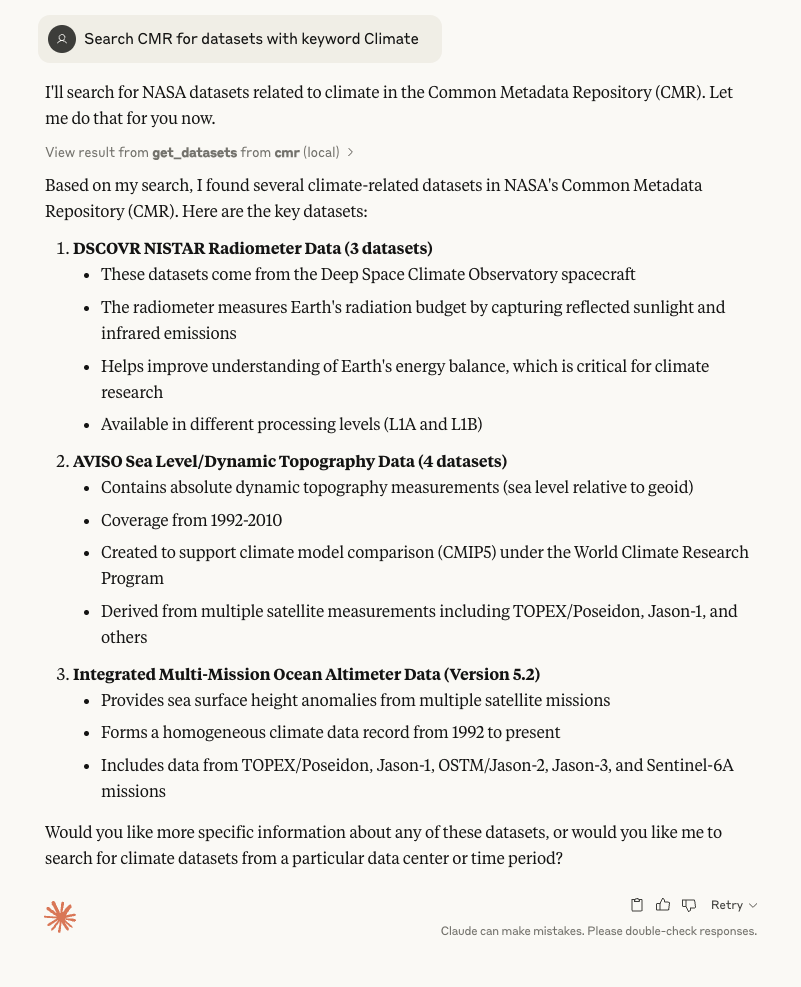
    Claude MCP usage

    Other prompts that can work:

    1. Search CMR for datasets from 2024 to 2025

    2. Search CMR for PO.DAAC datasets from 2020 to 2024 with keyword Climate

    Similar MCP

    Based on tags & features

    • AD

      Adls Mcp Server

      Python·
      4
    • BO

      Books Mcp Server

      Python·
      5
    • CH

      Chuk Mcp Linkedin

      Python00
    • PU

      Pursuit Mcp

      Python00

    Trending MCP

    Most active this week

    • PL

      Playwright Mcp

      TypeScript·
      22.1k
    • SE

      Serena

      Python·
      14.5k
    • MC

      Mcp Playwright

      TypeScript·
      4.9k
    • MC

      Mcp Server Cloudflare

      TypeScript·
      3.0k
    View All MCP Servers

    Similar MCP

    Based on tags & features

    • AD

      Adls Mcp Server

      Python·
      4
    • BO

      Books Mcp Server

      Python·
      5
    • CH

      Chuk Mcp Linkedin

      Python00
    • PU

      Pursuit Mcp

      Python00

    Trending MCP

    Most active this week

    • PL

      Playwright Mcp

      TypeScript·
      22.1k
    • SE

      Serena

      Python·
      14.5k
    • MC

      Mcp Playwright

      TypeScript·
      4.9k
    • MC

      Mcp Server Cloudflare

      TypeScript·
      3.0k