MCP Server (Resources, Tools, Prompts)
Documentation
MCP Server
Overview
MCP is an open protocol that standardizes how applications provide context to LLMs and is often called the "USB-C port for AI Applications". MCP provides a standardized way to connect AI models to different data sources, prompts and tools.
An MCP (Model Context Protocol) server provides Resources, Tools, and Prompts to an application, enabling it to enhance its communication with a Large Language Model (LLM) or Small Language Model (SLM). The application initiates the MCP server—typically within its own security context—and communicates with it via standard I/O (stdio)
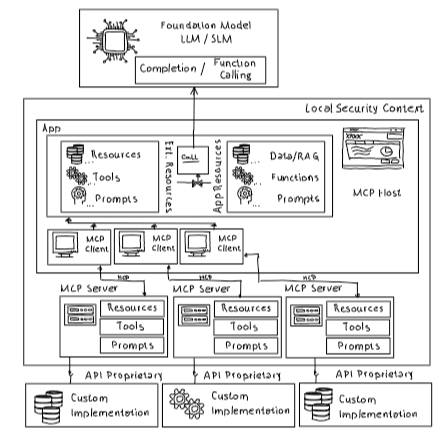
An application is not limited to a single MCP server; it can start and interact with multiple MCP servers simultaneously, each providing distinct Resources, Tools, and Prompts. While there is a one-to-one relationship between each MCP client (initiated by the application) and its corresponding MCP server, the application can manage several such pairs. In the given example, three MCP servers are launched, each contributing their own contextual assets to enhance model interactions.
*Tools*: Often used to provide functionality to the application (e.g. retrieve private information, perform specific tasks etc.). A list of available MCP server tools can be provided by the app to the LLM/SLM instance (with function calling capabilities) where most SDKs wrap the necessary function or tool calls to the MCP server automatically.
*Resources*: Data which the app can request from the MCP server to e.g. ground LLM/SLM calls. The app can also subscribe to a MCP resource to get continous updates (if new information is available). The MCP server implements the necessary update logic.
*Prompts*: The MCP server can provide prompt templates for the app to send to LLMs/SLMs.
Repo Content
The repo contains a simplified c# MCP Server and a c# console application consuming Tools, Resources and and a script to setup an Azure OpenAI instance with a deployed gpt-4 model instance:
| Folder | Appliation |
|---|---|
| ./src/SportApp | A simplified c# console application which uses Tools, Prompts and Resources from SportKnowHow_McpServer |
| ./src/SportKnowHow_McPServer | A simplified c# Mcp Server |
| ./setup/setup.azcli | A powershell Azure CLI script to setup the necessary Azure OpenAI instance with deployed gpt-4 instance |
Demo Application
Overview "SportsApp"
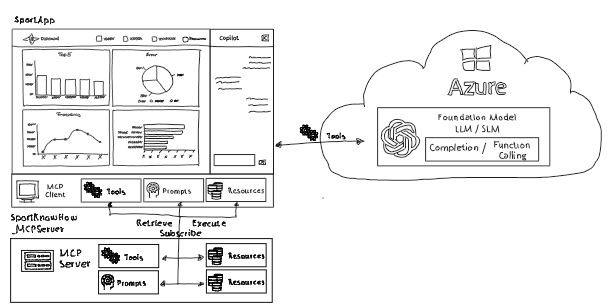
- SportApp starts the provided MCP server using dotnet run and stdio
//MCP Server: start parameter
        string command = "dotnet";
        string[] arguments = new string[] {
            "run",
            "--project",
            "./src/SportKnowHow_MCPServer/SportKnowHow_MCPServer.csproj"};

        //MCP Server: communication protocol
        StdioClientTransportOptions stdioClientTransportOptions = new StdioClientTransportOptions()
        {
            Name = "Sport Know How (MCP Server)",
            Command = command,
            Arguments = arguments,
        };
        StdioClientTransport stdioClientTransport = new StdioClientTransport(stdioClientTransportOptions);

        //Start MCP Server
await using IMcpClient mcpClient = await McpClientFactory.CreateAsync(stdioClientTransport);- All available tools provided by the MCP server are listed
- The tool with id
RetrieveWinnerwith parametereventName' andeventDate` is executed
//List available tools
        IList mcpClientTools = await mcpClient.ListToolsAsync();

        //Manual tool call
        string toolName = "RetrieveWinner";
        Dictionary callParameter = new Dictionary
        {
            { "eventName", "Super Sports Champtionship" },
            { "eventDate", "2025-01-01"}
        };
CallToolResponse callToolResponse = await mcpClient.CallToolAsync(toolName, callParameter);- The MCP server tools are provided to a LLM/SLM completion call using
Microsoft.Extensions.AI. There's no need to intercept the LLM/SLM function tooling requests aschatClient.RetResponse()takes care of calling the MCP Server tools as requested by the LLM and provides results back to the LLM.
//Use tools in chat completions
        ...
        string systemMessage = "You help with information around international sport events.";
        string userMessage = "Who won the Super Sports Championship 2025?";
        var chatMessages = new List
        {
            new ChatMessage (Microsoft.Extensions.AI.ChatRole.System, systemMessage),
            new ChatMessage (Microsoft.Extensions.AI.ChatRole.User, userMessage)
        };
        ChatResponse chatResponse = await chatClient.GetResponseAsync(
            chatMessages,
            new ChatOptions
            {
                Tools = mcpClientTools.ToArray()
            }
        );
...- Within the MCP server defined prompts are listed and a specific prompt (
CreateMatchSummaryPrompt) with parameters is requested.
// List available prompts
        IList mcpClientPrompts = await mcpClient.ListPromptsAsync();

        // Retrieve specific prompt
        string promptName = "CreateMatchSummaryPrompt";
        Console.WriteLine($"Retrieve prompt: {promptName}");
        Dictionary promptParameter = new Dictionary
        {
            { "eventName", "Munich Flying Dolphins vs. Berlin Bears" },
            { "winner", "Munich Flying Dolphins" },
            { "score", "24:31" },
            { "enthusiasm", "high" }
        };
GetPromptResult getPromptResult = await mcpClient.GetPromptAsync(promptName, promptParameter);- Within the MCP server defined resources templates and resources are listed and requested.
//List available resource templates
        string resourceTemplateUri = "";
        IList mcpClientResourceTemmplates = await mcpClient.ListResourceTemplatesAsync();

        //Retrieve a specific resource template
        resourceTemplateUri = resourceTemplateUri.Replace("{id}", "NurembergFlyingTigers");
        ReadResourceResult readResourceTemplateResult = await mcpClient.ReadResourceAsync(resourceTemplateUri);

        //List available resources
        string resourceUri = "";
        IList mcpClientResources = await mcpClient.ListResourcesAsync();

        // Retrieve a specific resource
ReadResourceResult readResourceResult = await mcpClient.ReadResourceAsync(resourceUri);- A subsription with the MCP server is created. The MCP server can send updates whenever the underlying resource is changed.
// Subscribe to resources
        mcpClient.RegisterNotificationHandler("notifications/resource/updated", NotificationHandler);
        await mcpClient.SubscribeToResourceAsync("sportIntelligence://team/MunichFlyingDolphins");
Overview "SportKnowHow_McpServer
- MCP Server creation with Tools, Prompts and Resource support.
//create MCP server
    HostApplicationBuilder hostApplicationBuilder = Host.CreateApplicationBuilder(args);
    hostApplicationBuilder.Logging.AddConsole(consoleLogOptions =>
    {
        consoleLogOptions.LogToStandardErrorThreshold = LogLevel.Trace;
    });

    hostApplicationBuilder.Services
        .AddMcpServer()
        .WithStdioServerTransport()
        .WithTools()
        .WithPrompts()
        .WithResources()
        .WithSubscribeToResourcesHandler(SubscribeToResourcesHandler)
        .WithUnsubscribeFromResourcesHandler(UnsubscribeFromResourcesHandler)
        .WithReadResourceHandler(ReadResourceHandler);

    hostApplicationBuilder.Services.AddSingleton(resourceSubscriptions);
    hostApplicationBuilder.Services.AddHostedService();
Summary
MCP Server which often exectue in the security context of the calling applications make it easy to provide tools,resources and prompts to calling applications. Just like shown in the sample SportApp application the ModelContextProtocol nuget package simplifies the development of Mcp Server and Mcp Host applicatons.
Similar MCP
Based on tags & features
Trending MCP
Most active this week