MCP server to interact with your Asgardeo organization through LLM tools
Documentation
Asgardeo MCP Server
The Asgardeo MCP Server allows you to manage your Asgardeo organization or WSO2 Identity Server deployment seamlessly using LLM tools, enabling natural language interactions for various configuration tasks.
[!IMPORTANT]
Experimental Feature Notice
This software includes experimental functionality and is not intended for use in production environments.
Features, APIs, and functionality may change as the implementation evolves without prior notice.
Key Use Cases
With tools like Claude Desktop, you can:
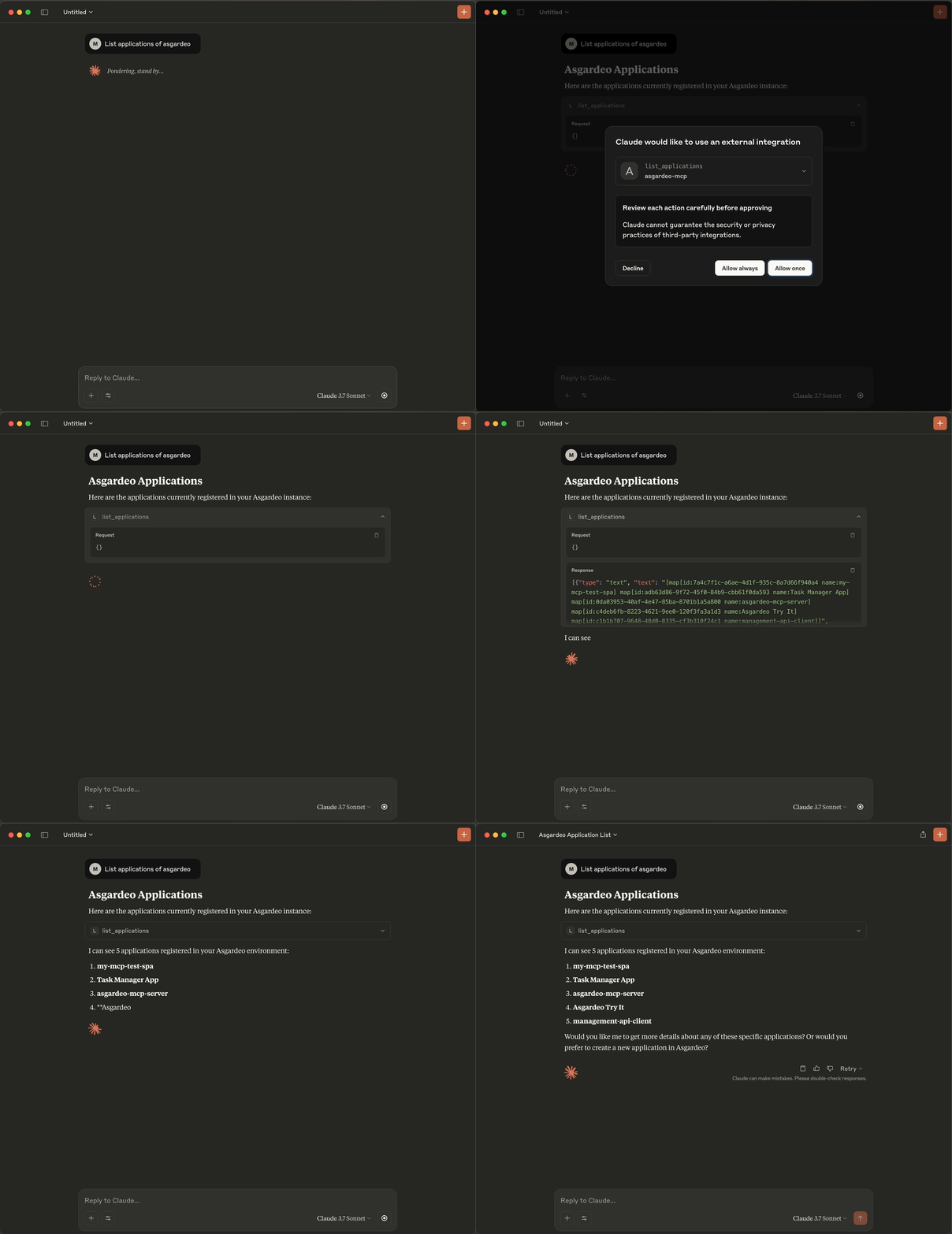
- List Applications: Retrieve a list of all applications in your organization.
- Create Applications: Set up single-page, web, mobile or m2m applications and integrate it with the Asgardeo authentication SDK.
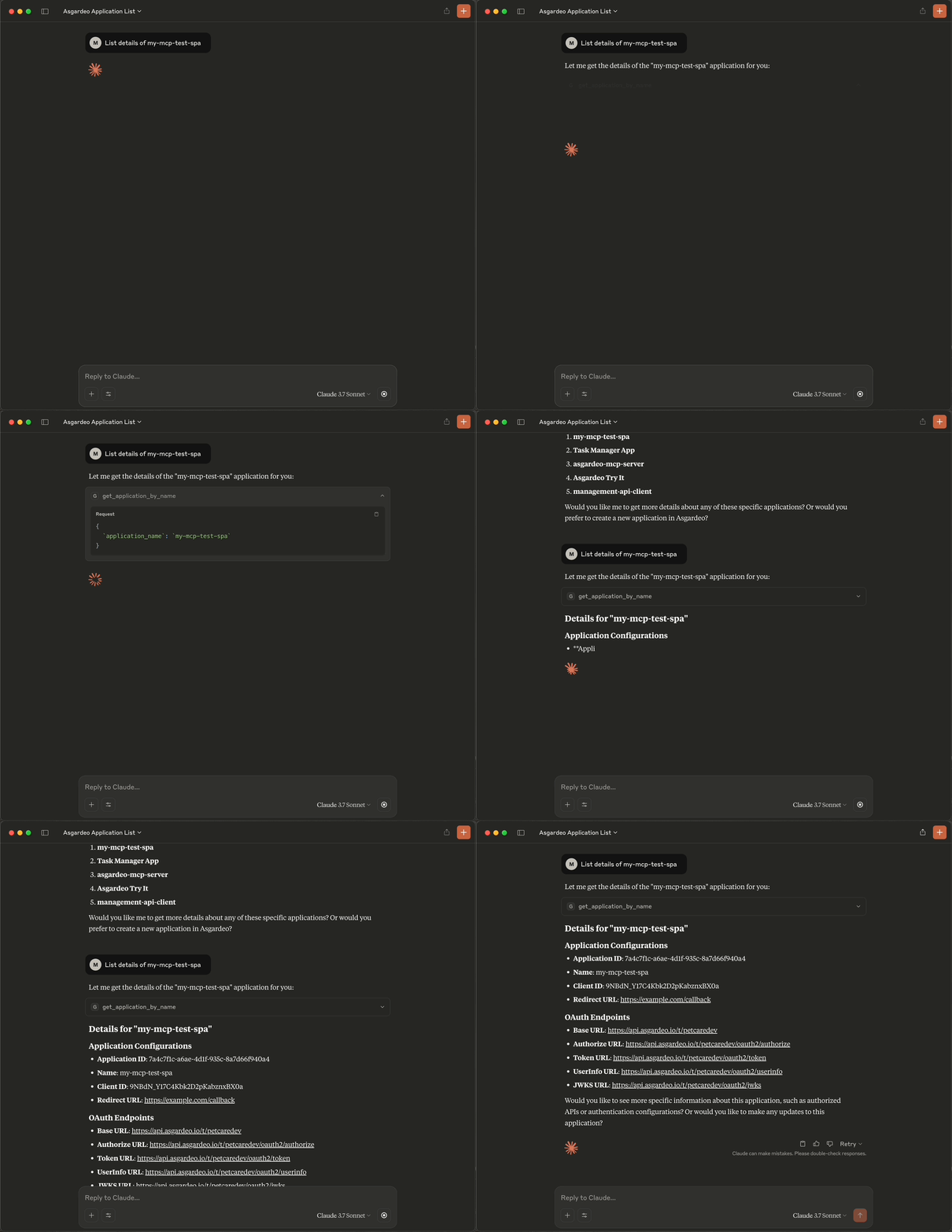
- Retrieve Application Details: Fetch detailed information about specific applications.
- Configure Login Flows: Customize the login flow of an application using natural language prompts and the available tools, enabling seamless user authentication experiences.
Demonstrations
- Listing Applications in Claude
- Fetching Application Details in Claude
---
How to Use
On Asgardeo / WSO2 Identity Server
1. Create an M2M Application: Set up an M2M application in your organization.
2. Authorize Management APIs: Grant the following scopes to the application:
| API | Scopes |
|---|---|
Application Management API (/api/server/v1/applications) | internal_application_mgt_view, internal_application_mgt_update, internal_application_mgt_create |
API Resource Management API (/api/server/v1/api-resources) | internal_api_resource_create, internal_api_resource_view |
Identity Provider Management API (/api/server/v1/identity-providers) | internal_idp_view |
Authenticators Management API (/api/server/v1/authenticators) | internal_authenticator_view |
Claim Management API (/api/server/v1/claim-dialects) | internal_claim_meta_view |
SCIM2 Users API (/scim2/Users) | internal_user_mgt_create |
OIDC Scope Management API (/api/server/v1/oidc/scopes) | internal_oidc_scope_mgt_view |
3. Copy Credentials: Save the client ID and client secret of the M2M application.
On Your Machine
4. Clone the Repository:
git clone https://github.com/asgardeo/asgardeo-mcp-server.git5. Install Dependencies:
go mod tidy6. Build the Executable:
go build -o asgardeo-mcp This will create the asgardeo-mcp binary in the current directory (e.g., /Users//asgardeo-mcp-server/asgardeo-mcp). Note down this absolute path as you will need it in the next step.
7. Configure Your MCP Client:
VS Code (GitHub Copilot)
- Install the GitHub Copilot extension.
- Open the Command Palette (
Ctrl+Shift+P/Cmd+Shift+P) and selectMCP: Open User Configuration. - Add the following server configuration to the
mcp.jsonfile:
{
    "servers": {
        "asgardeo-mcp-server": {
            "type": "stdio",
            "command": "",
            "args": [],
            "env": {
                "BASE_URL" : "https://api.asgardeo.io/t/",
                "CLIENT_ID" : "",
                "CLIENT_SECRET" : ""
              }
            }
    }
}- Save the file and start the MCP server from
mcp.json.
Claude Desktop
- Open Claude Desktop and navigate to
Settings > Developer. - Edit the
claude_desktop_config.jsonfile:
"asgardeo-mcp": {
   "command": "",
   "args": [],
   "env": {
    "BASE_URL": "https://api.asgardeo.io/t/",
    "CLIENT_ID": "",
    "CLIENT_SECRET": ""
   }
}- Restart Claude Desktop.
Cursor
- Open Cursor and navigate to
Settings > MCP. - Edit the
mcp.jsonfile:
"asgardeo-mcp": {
   "command": "",
   "args": [],
   "env": {
    "BASE_URL": "https://api.asgardeo.io/t/",
    "CLIENT_ID": "",
    "CLIENT_SECRET": ""
   }
  }
[!NOTE]
- If you are using the WSO2 Identity Server, you need to set an additional environment variable named
PRODUCT_MODEtowso2is.- Also, replace the
BASE_URLwith your WSO2 Identity Server base URL (e.g.,https:///t/).- Additionally, if you are using WSO2 Identity Server for local development or in internal networks, you may need to set the certificate authority (CA) for the server to avoid SSL errors. You can do this by setting the
CERT_PATHenvironment variable to the path of your CA certificate file.
---
Available Tools
The Asgardeo MCP Server provides the following tools for interacting with your organization:
Application Management
| Tool Name | Description | Parameters |
|---|---|---|
list_applications | Lists all applications in your organization | None |
create_single_page_app | Creates a new Single Page Application | application_name (required): Name of the applicationredirect_url (required): Redirect URL for the application |
create_webapp_with_ssr | Creates a new web application with server-side rendering | application_name (required): Name of the applicationredirect_url (required): Redirect URL for the application |
create_mobile_app | Creates a new Mobile Application | application_name (required): Name of the applicationredirect_url (required): Redirect URL for the application |
create_m2m_app | Creates a new Machine-to-Machine Application | application_name (required): Name of the application |
get_application_by_name | Gets details of an application by name | application_name (required): Name of the application to search for |
get_application_by_client_id | Gets details of an application by client ID | client_id (required): Client ID of the application |
update_application_basic_info | Updates basic information of an application | id (required): ID of the applicationname, description, image_url, access_url, logout_return_url (optional) |
update_application_oauth_config | Updates OAuth/OIDC configurations of an application | id (required): ID of the applicationredirect_urls, allowed_origins, user_access_token_expiry_time, application_access_token_expiry_time, refresh_token_expiry_time, etc. (optional) |
update_application_claim_config | Updates claim configurations of an application | id (required): ID of the applicationclaims (required): List of requested claim URIs (Claim URIs should be specified using the default WSO2 claim dialect. Eg: http://wso2.org/claims/username) |
authorize_api | Authorizes an application to access an API | appId (required): ID of the applicationid (required): ID of the API resourcepolicyIdentifier (required, default: "RBAC"): Authorization policyscopes (required): Scopes to authorize |
list_authorized_api | Lists authorized API resources of an application | app_id (required): ID of the application |
update_login_flow | Updates login flow in an application based on a natural language prompt | app_id (required): ID of the applicationuser_prompt (required): Natural language description of the desired login flow |
API Resource Management
| Tool Name | Description | Parameters |
|---|---|---|
list_api_resources | Lists API resources in your organization | filter (optional): Filter expressionlimit (optional): Maximum results to return |
search_api_resources_by_name | Searches for API resources by name | name (required): Name of the API resource to search for |
get_api_resource_by_identifier | Gets an API resource by its identifier | identifier (required): Identifier of the API resource |
create_api_resource | Creates a new API resource | identifier (required): Identifier for the API resourcename (required): Name of the API resourcerequiresAuthorization (required): Whether the API requires authorizationscopes (required): List of scopes for the API |
User Management
| Tool Name | Description | Parameters |
|---|---|---|
create_user | Creates a user in your organization | username (required): Usernamepassword (required): Passwordemail (required): Email addressfirst_name (required): User's first namelast_name (required): User's last nameuserstore_domain (optional, default: "DEFAULT"): Userstore domain |
Claim Management
| Tool Name | Description | Parameters |
|---|---|---|
list_claims | Lists claims in your organization | None |
[!NOTE]
If you are using the WSO2 Identity Server and planning to use
update_login_flowtool, make sure to follow the steps in Subscribe to AI features.
---
Example Prompts
Application Management
- Create a SPA:
Create a new Single Page Application named "My Demo App" with redirect URL "https://example.com/callback".- Update Application:
Update my application with ID "abc123" to have a new name "Updated App".- Update Application Login Flow:
Update the login flow of my application with ID "abc123" to Username and Password as the first step and Email OTP as the second step.- Update Application Claim Configuration:
Update the claim configuration of my application with ID "abc123" to include "username", and "last_name".API Resource Management
- Create and Authorize API:
Create a new API resource named "Customer API" and authorize my application to access it with "read:customers" scopes.User Management
- Create a User:
Create a test user with the username and email address 'test@example.com'.Claim Management
- Get Claim list:
List all claims in my Asgardeo organization.---
Troubleshooting
Authentication & Permissions
- Invalid Credentials: Verify your client ID, client secret, and organization name in the base URL
- 403 Forbidden: Check if your M2M application has all required scopes authorized
Setup & Connection
- Build Issues: Ensure Go 1.18+ is installed, run
go mod tidybefore building - MCP Connection: Verify executable path is absolute and correct, check permissions (
chmod +x asgardeo-mcp)
Getting Help
If issues persist after troubleshooting:
- Check GitHub issues
- Create a new detailed issue including error messages and environment info
- Join the WSO2 community forums for support
---
Contributing
Contributions are welcome! Submit issues or pull requests via the GitHub repository.
Similar MCP
Based on tags & features
Trending MCP
Most active this week